Blender Task Manager (Trello API)




1 / 9
Blender Task Manager (Trello API)
Manage Trello tasks without leaving Blender: browse and filter task cards, import attached assets into your scene, automate model checking, and send work for review with files attached. Everything inside Blender!
Main features:
- Browse cards from Trello Boards in Blender's side panel
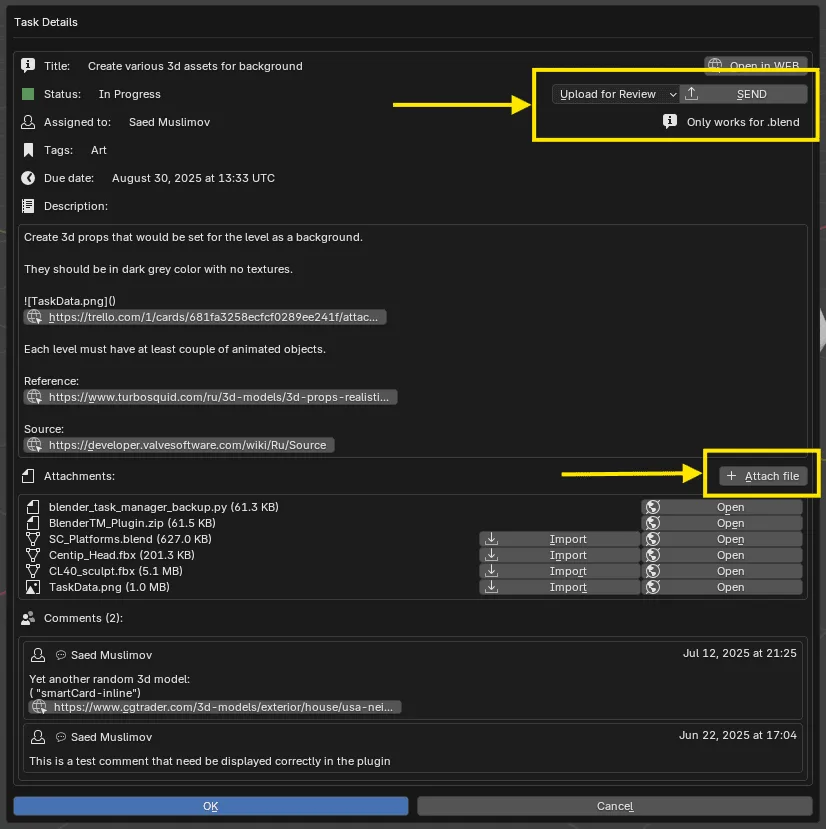
In tasks: view title, description, tags, deadlines and also click on links in the description and comments. And you can also switch statuses when task is completed. - Import models and textures directly from task attachments
No more downloading separately and importing, one-click is enough! And you can download regular files as well. - Upload files to task attachments from Blender
In the task window you can also upload any files to attachments and send/export models for review. - Task filters
Filter tasks by name, tags and assigned members. Easier to find necessary tasks in a big project.
Note: "Tags = Labels from Trello" and just color grouping wouldn't create tags for add-on to read. - Quick access to links
Open tasks and projects in browser from Blender.
Personal License
$20.00
For use on personal projects
Files (3)
blender_taskmanager.zip
zip
647 kB
Blender_TaskManager-Setup_Guide.pdf
pdf
708 kB
Creating_Your_Own_Validator_Script.pdf
pdf
92.2 kB
Total size: 1.45 MB
Commercial License
$200.00
For use on commercial projects
Files (3)
blender_taskmanager.zip
zip
647 kB
Blender_TaskManager-Setup_Guide.pdf
pdf
708 kB
Creating_Your_Own_Validator_Script.pdf
pdf
92.2 kB
Total size: 1.45 MB
Blender Task Manager (Trello API)
Manage Trello tasks without leaving Blender: browse and filter task cards, import attached assets into your scene, automate model checking, and send work for review with files attached. Everything inside Blender!
Main features:
- Browse cards from Trello Boards in Blender's side panel
In tasks: view title, description, tags, deadlines and also click on links in the description and comments. And you can also switch statuses when task is completed. - Import models and textures directly from task attachments
No more downloading separately and importing, one-click is enough! And you can download regular files as well. - Upload files to task attachments from Blender
In the task window you can also upload any files to attachments and send/export models for review. - Task filters
Filter tasks by name, tags and assigned members. Easier to find necessary tasks in a big project.
Note: "Tags = Labels from Trello" and just color grouping wouldn't create tags for add-on to read. - Quick access to links
Open tasks and projects in browser from Blender.
Product Details
